If you want to run Python without installing it on your systems, check the seven best Python interpreters to execute Python online. Many of our readers informed us that they want to learn Python but face problems with installation. They ask questions like which version of Python 2.7 or 3.0 to use and get wary of the code in-compatibility.
- What’s the Best Way to Run Python Online?
- The 7 Best Python Interpreters – Explore Now!
- Python Interpreter from Python.org
- PythonAnyWhere’s Online Python Interpreter
- Python 2.x/3.x Interpreter from Trinket.io
- AI-Based Python Interpreter from Newtum
- RexTester’s Python Interpreter
- Python Interpreter from TutorialsPoint.com
- Ideone’s Python Interpreter
- What’s next? Got a Python interpreter to Run your code?
So today, we are listing down top websites that provide online coding and execution support. Each one of these sites provides completely free and no-login access. So, they are a perfect on-the-fly solution to test and run Python online. If you wish to learn Python step by step, then do go through our premium course:
What’s the Best Way to Run Python Online?
Many of you would love to run Python on your mobile phones or tablets. And yes, it’s absolutely possible! Several websites provide virtual terminals for practicing Python online, making it super convenient—especially when you want to avoid the hassle of installation and uninstallation
To help our readers find the best virtual terminal, we evaluated several websites based on key selection criteria. Our evaluation focused on reliability, speed, support for at least one version of Python 2 or 3, and ease of copying and pasting code.
After testing multiple platforms, we identified the top 7 websites for practicing Python online. Some of these platforms even support multiple programming languages, adding to their versatility. We encourage you to explore each option and choose the one that best fits your needs.
The 7 Best Python Interpreters – Explore Now!
Python Interpreter from Python.org
It’s one of the fastest online virtual terminals to execute Python online. It includes the following features to help you.

- You can easily copy and paste your commands into the terminal console.
- It has an enhanced interactive shell named IPython running at the backend.
- It’s a mile superior to the default Python shell.
- IPython offers powerful object introspection features.
- It brings you easy access to OS commands and integrates with your text editor.
There is also a walkthrough video available on the site, which you can refer to learn more about the virtual terminal console. However, you can launch it from here: Python.org
PythonAnyWhere’s Online Python Interpreter
It is an advanced Python terminal to learn and practice Python online. It comes with some incredible features like tab completion and object introspection, which come in super handy while programming.

The following are a few quick points to make you familiar with the terminal.
- It is super-easy to enter commands into the terminal console.
- Type imp and tab to expand the complete command. Then write the “sys” keyword to import the sys module.
- Import sys
- To get the full documentation of any module (e.g., sys in this case), write as.
- Like – type sys?
- Type imp and tab to expand the complete command. Then write the “sys” keyword to import the sys module.
- There is the %save keyword to store the command into a file.
- Type a = 15 and return. Note down the line number (it’s in the square brackets in front of the line).
- Now type %save set_a.py line number to save that line to a file.
- To find out more about the %save magic function, you can type %save.
- %edit set_a.py will open vi to edit the file. If you use vi, then you can modify any file you want.
Check out from here: PythonAnyWhere.com
Python 2.x/3.x Interpreter from Trinket.io
Trinket is a website that provides a platform for coding in Python, JavaScript, HTML, and other programming languages. The name “Trinket” is likely a reference to the small, decorative objects that are often used as ornaments or souvenirs. In the context of the website, the name may suggest that the code snippets or projects created on Trinket are small, self-contained, and perhaps even whimsical or fun, like trinkets.

Let’s look at some of the key points about this online Python interpreter.
- If you are a beginner, then you can start with the code examples available on the site.
- It allows the saving of your work and sharing it with others.
- You can preserve active session contents and resume from where you’d left off.
- Since it’s a web application, it would virtually work from any device using a web browser.
Visit it from here: Trinket.io
AI-Based Python Interpreter from Newtum
Newtum developed an innovative solution by adding AI support within their virtual online Python code interpreter. It is quite an ideal tool to run Python code online in your web browsers.
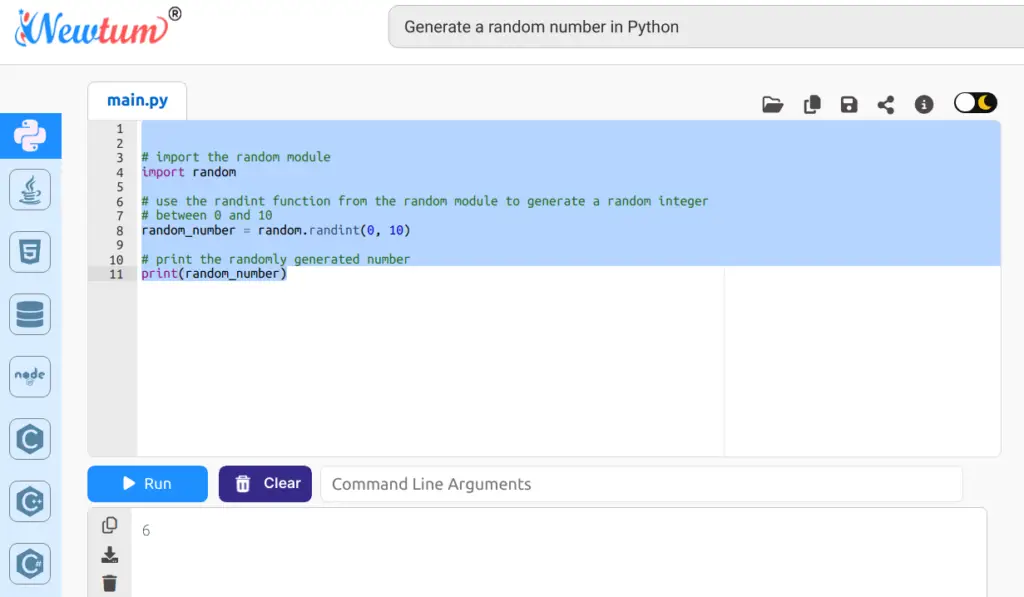
Here is a quick overview of this AI-based online Python compiler.
- You can write code, run it, save, copy, share with friends, and work in normal/dark mode.
- It has an AI search box placed just above the IDE. Enter the query letting it know the coding problem you want the code for. Based on your query, it instantly embeds the working code snippet in the IDE.
- Interestingly, you not only get the code you wanted but this tool even generates a brief explanation about the topic of your query in the side view.
- They don’t mention any limitations about the usage. However, it is worth trying for free.
Visit it from here: Newtum.com
RexTester’s Python Interpreter
Rextester’s online editor is a comprehensive web-based application to help you execute Python online. This tool becomes handy for your Python coding practice.

Some of the notable features it provides are.
- All the commands get to run on Linux.
- It supports both Python 2.7 and 3.6 versions.
- Your code will execute from a Python wrapper, which sets various limits to the process.
- You’ll have a max. of 30 seconds to compile, max. 5 sec of CPU time to run, and limited memory of up to (~1.5GB).
- Your process and all its children will run in a newly created process group. And it’ll terminate after 10 seconds from the start.
Check it out from here: Rextester.com
Python Interpreter from TutorialsPoint.com
TutorialsPoint provides an online Python compiler, a web-based tool that allows users to write, compile, and execute Python code directly in their web browser.
It allows users to choose between Python 2 and Python 3. Users can type their code directly into the provided editor and click the “Compile & Execute” button to see the output.

The online Python compiler also includes additional features, such as the ability to save and load code snippets, a debugger, and share code snippets with others.
Overall, the online Python compiler provided by TutorialsPoint is a convenient tool for users who do not want to install Python on their local machine or prefer to work with Python code in a web-based environment.
Try it from here: TutorialsPoint.com
Ideone’s Python Interpreter
Ideone is an online compiler and a debugging tool for Python coding practice. It enables you to compile the source and execute it online in multiple languages.

Here are a few points to consider before you decide to go with this tool.
- Select the “Python” programming language, and enter the commands with input data.
- It supports both Python 2 and Python 3 versions.
- You can also refer to the samples available on the website.
- This editor makes use of Sphere Engine technology for execution.
- It creates a secure channel for executing programs on a remote server.
Give it a try from here: Ideone.com
What’s next? Got a Python interpreter to Run your code?
So, interested in executing Python online? Wait no further! Choose one or two of the above Python interpreters from our list of top 7 online Python interpreters and save time and effort. Not only will these tools make your coding experience more efficient, but they’ll also accelerate your learning.
But wait, there’s more! If you’re already using an online Python interpreter that you believe deserves a spot on our list, please share it with us.
Finally, to keep our site free, we need your support! If you found this tutorial helpful, please share it on social media and subscribe to our YouTube channel. 🚀🎥
Happy Coding,
TechBeamers